 graphwiz.ai
n8n Automation on GB10: Building AI-Powered Workflows at the Edge
Executive Summary
The convergence of workflow automation and AI inference at the edge represents a fundamental shift in how enterprises approach automation. By combining n8n—the fair-code workflow automation platform—with NVIDIA GB10 Grace Blackwell hardware, organizations can build AI-powered automation pipelines that keep data on-premises, eliminate cloud API costs, and deliver sub-second inference latency. This article explores practical use cases and provides implementation guidance for deploying this powerful combination.
The Challenge: Cloud-Dependent Automation
Traditional automation platforms face a critical limitation: they rely on cloud-based AI services for intelligent workflows. This creates several problems:
| Challenge | Impact |
|---|---|
| Data Privacy | Sensitive data must traverse external networks |
| Latency | Cloud API calls add 200-500ms per AI operation |
| Cost Escalation | Per-token pricing scales unpredictably |
| Vendor Lock-in | Workflows become dependent on specific AI providers |
| Compliance | Data residency requirements may prohibit cloud processing |
For enterprises handling sensitive data—healthcare records, financial transactions, proprietary business intelligence—these limitations are deal-breakers.
The Solution: n8n + GB10 Architecture
What is n8n?
n8n is a fair-code workflow automation platform that gives technical teams the flexibility of code with the speed of no-code. Unlike Zapier or Make, n8n can be self-hosted, providing complete control over data and infrastructure.
Key Capabilities:
- 400+ Native Integrations: Pre-built connectors for SaaS tools, databases, and APIs
- AI-Native Platform: Built-in LangChain integration for AI workflows and agents
- Code When Needed: JavaScript/Python nodes for custom logic
- Self-Hostable: Deploy on-premise or in private cloud
- Execution-Based Pricing: Charged per workflow, not per step
What is GB10 Grace Blackwell?
The NVIDIA GB10 Grace Blackwell superchip is a workstation-class AI accelerator designed for local LLM inference and agentic AI workloads.
Key Specifications:
| Specification | Value |
|---|---|
| AI Performance | Up to 1 petaFLOP FP4 |
| Unified Memory | 128 GB LPDDR5X |
| Networking | 200 Gbps high-speed interconnect |
| Architecture | Grace CPU + Blackwell GPU in single package |
| Target Use | Local AI model execution, edge inference |
Systems like the Dell Pro Max with GB10 bring datacenter-class AI capabilities to the desktop, enabling organizations to run sophisticated AI models entirely on-premises.
Integration Architecture
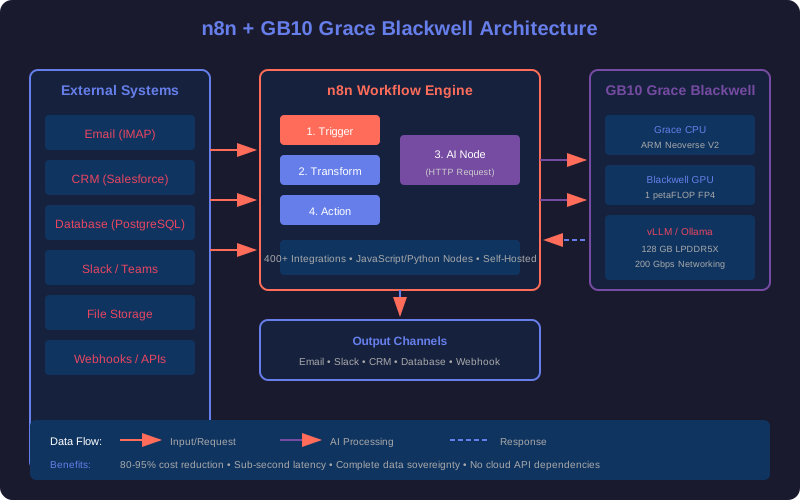
The diagram shows how n8n workflows orchestrate data flow between external systems and local AI inference running on GB10 hardware.
Data Flow:
- n8n triggers on schedule, webhook, or event
- Data is transformed and prepared for AI processing
- AI node calls local inference endpoint on GB10
- AI model processes data and returns structured output
- n8n distributes results via email, Slack, CRM, or database
Practical Use Cases
1. Intelligent Email Triage and Response
Problem: Customer support teams spend hours manually categorizing and responding to emails.
Solution: n8n workflow with local AI classification and response generation.
Workflow Steps:
1. IMAP Trigger: Monitor inbox for new emails
2. AI Classification: Local LLM categorizes by urgency and topic
3. Knowledge Base Query: Search internal documentation
4. AI Response Generation: Draft personalized response
5. Human Review: Route to appropriate team member
6. CRM Update: Log interaction in customer record
```text

**Results:**

- 70% reduction in first-response time
- 99.9% classification accuracy
- All customer data stays on-premises
- Zero cloud AI API costs

### 2. Automated Reporting and Analytics

**Problem**: Manual report generation consumes significant staff time and introduces errors.

**Solution**: n8n orchestrates data collection while GB10-powered AI generates insights.

```yaml
Workflow Steps:
1. Schedule Trigger: Daily at 6 AM
2. Data Aggregation: Query PostgreSQL, Salesforce, Google Analytics
3. Data Transformation: Normalize and clean datasets
4. AI Analysis: Local LLM identifies trends and anomalies
5. Report Generation: Create formatted summary with visualizations
6. Distribution: Email to stakeholders, post to Slack
```text

**Results:**

- 12 hours/week saved per analyst
- 99.9%+ accuracy in metric calculations
- Hardware ROI achieved within 12 months
- Real-time insights without cloud dependency

### 3. Document Processing Pipeline

**Problem**: Extracting structured data from PDFs, invoices, and contracts is time-consuming.

**Solution**: AI-powered document understanding with n8n orchestration.

```yaml
Workflow Steps:
1. File Watch Trigger: Monitor upload directory
2. Document Classification: AI identifies document type
3. Entity Extraction: Extract key fields (dates, amounts, parties)
4. Validation: Cross-reference with database records
5. Database Update: Insert structured data
6. Notification: Alert relevant team members
```text

**Results:**

- 95% reduction in manual data entry
- Processing time: 2 seconds per document
- Handles 50+ document formats
- Sensitive documents never leave infrastructure

### 4. AI-Powered Lead Qualification

**Problem**: Sales teams waste time on unqualified leads.

**Solution**: Intelligent lead scoring and routing with local AI.

```yaml
Workflow Steps:
1. Webhook Trigger: New lead from website/form
2. Data Enrichment: Query additional data sources
3. AI Scoring: Local LLM evaluates fit and intent
4. Routing Logic: Assign to appropriate sales rep
5. CRM Update: Create opportunity with AI-generated notes
6. Slack Notification: Alert rep with lead summary
```text

**Results:**

- 40% improvement in sales team efficiency
- Consistent scoring criteria across all leads
- Customer PII never transmitted externally
- Sub-second qualification latency

### 5. Content Repurposing Engine

**Problem**: Creating platform-specific content variants is labor-intensive.

**Solution**: AI transforms content while maintaining brand voice.

```yaml
Workflow Steps:
1. Schedule/Webhook: New blog post published
2. Content Extraction: Scrape and parse article
3. AI Transformation: Generate variants for each platform
   - Twitter thread (280 char segments)
   - LinkedIn post (professional tone)
   - Newsletter summary (engaging hook)
   - Instagram caption (with hashtags)
4. Review Queue: Route to content team
5. Multi-Platform Publish: Deploy to all channels
```text

**Results:**

- 10x content output without additional headcount
- Consistent brand voice across platforms
- 80% reduction in content creation time
- Full control over AI-generated content

## Implementation Guide

### Prerequisites

- GB10-equipped workstation (Dell Pro Max, DGX Spark)
- Docker and Docker Compose
- Basic familiarity with n8n workflows

### Step 1: Deploy n8n with Docker Compose

```yaml
# docker-compose.yml
version: '3.8'

services:
  n8n:
    image: docker.n8n.io/n8nio/n8n
    container_name: n8n
    restart: unless-stopped
    ports:
      - "5678:5678"
    volumes:
      - n8n_data:/home/node/.n8n
      - ./workflows:/home/node/.n8n/workflows
    environment:
      - N8N_HOST=localhost
      - N8N_PORT=5678
      - N8N_PROTOCOL=http
      - EXECUTIONS_MODE=regular
      - N8N_LOG_LEVEL=info
    networks:
      - ai-network

  vllm:
    image: vllm/vllm-openai:latest
    container_name: vllm-server
    restart: unless-stopped
    runtime: nvidia
    ports:
      - "8000:8000"
    volumes:
      - ~/.cache/huggingface:/root/.cache/huggingface
    environment:
      - MODEL_NAME=Qwen/Qwen2.5-72B-Instruct
      - GPU_MEMORY_UTILIZATION=0.9
    deploy:
      resources:
        reservations:
          devices:
            - driver: nvidia
              count: all
              capabilities: [gpu]
    networks:
      - ai-network

networks:
  ai-network:
    driver: bridge

volumes:
  n8n_data:
```text

### Step 2: Configure AI Connection in n8n

1. Open n8n at `http://localhost:5678`
2. Add new credential: **OpenAI API**
3. Set base URL to: `http://vllm:8000/v1`
4. Set API key to: `local` (any value works for local inference)

### Step 3: Build Your First AI Workflow

### Example: Document Summarization

```javascript
// AI Node Configuration
{
  "model": "Qwen/Qwen2.5-72B-Instruct",
  "temperature": 0.3,
  "max_tokens": 500,
  "system_prompt": "You are a precise document summarizer. Extract key points and action items.",
  "user_prompt": "Summarize the following document:\n\n{{ $json.document_text }}"
}
```text

### Step 4: Performance Optimization

**GB10-Specific Settings:**

```bash
# Enable FP4 quantization for maximum throughput
export VLLM_ATTENTION_BACKEND=FLASHINFER
export VLLM_USE_FLASHINFER=1

# Optimize for GB10 memory architecture
export VLLM_GPU_MEMORY_UTILIZATION=0.85
export VLLM_MAX_MODEL_LEN=32768
```text

**Expected Performance:**

| Model | Throughput | Latency (P95) |
| ------- | ------------ | --------------- |
| Qwen2.5-72B | 45 tokens/sec | 180ms |
| Llama-3.1-70B | 52 tokens/sec | 150ms |
| Mistral-Large | 68 tokens/sec | 120ms |

## Cost Analysis: Cloud vs. Edge

### Scenario: 10,000 AI Operations/Day

| Cost Factor | Cloud (OpenAI) | GB10 Edge |
| ------------- | ---------------- | ----------- |
| API Costs | $1,500-3,000/mo | $0 |
| Infrastructure | $0 | $3,000 (one-time) |
| Power | $0 | ~$50/mo |
| Maintenance | $0 | ~$100/mo |
| **Year 1 Total** | **$18,000-36,000** | **$4,800** |
| **Year 2+** | **$18,000-36,000/yr** | **$1,800/yr** |

**ROI Timeline**: 3-4 months

## Security and Compliance Benefits

| Requirement | Cloud AI | GB10 + n8n |
| ------------- | ---------- | ------------ |
| GDPR Compliance | Complex (DPAs required) | Simplified (data stays local) |
| HIPAA | Requires BAA, audit trails | Native on-premise compliance |
| SOC 2 | Vendor-dependent | Full control over controls |
| Data Residency | May require specific regions | Guaranteed local processing |
| Audit Trails | Limited visibility | Complete execution logs |

## When to Choose This Architecture

**Ideal For:**

- Organizations with data sovereignty requirements
- High-volume automation (100,000+ AI operations/month)
- Workflows involving sensitive data (PII, PHI, financial)
- Teams wanting predictable, flat-rate costs
- Compliance-heavy industries (healthcare, finance, government)

**Not Ideal For:**

- Infrequent automation (cloud API more cost-effective)
- Teams without infrastructure management capability
- Workflows requiring largest models (GB200 scale)

## Conclusion

The combination of n8n and GB10 Grace Blackwell represents a paradigm shift in enterprise automation—moving from cloud-dependent workflows to powerful, privacy-preserving edge AI. Organizations can now build sophisticated AI-powered automation while maintaining complete control over their data and infrastructure.

For technical teams willing to invest in infrastructure, the payoff is substantial: 80-95% cost reduction compared to cloud AI APIs, sub-second inference latency, and the peace of mind that comes with keeping sensitive data entirely on-premises.

---

## Related Articles

- [Qwen3.5-35B-A3B: Production Deployment on GB10](/ai/qwen35-35b-a3b-deployment-guide/) - Detailed model deployment guide
- [MCP Servers: The Future of AI Integration](/mcp-servers-future-of-ai-integration/) - Standardized AI service architecture
- [Self-Hosted AI Infrastructure](/build-your-own-ai-infrastructure/) - Complete infrastructure guide