The Problem
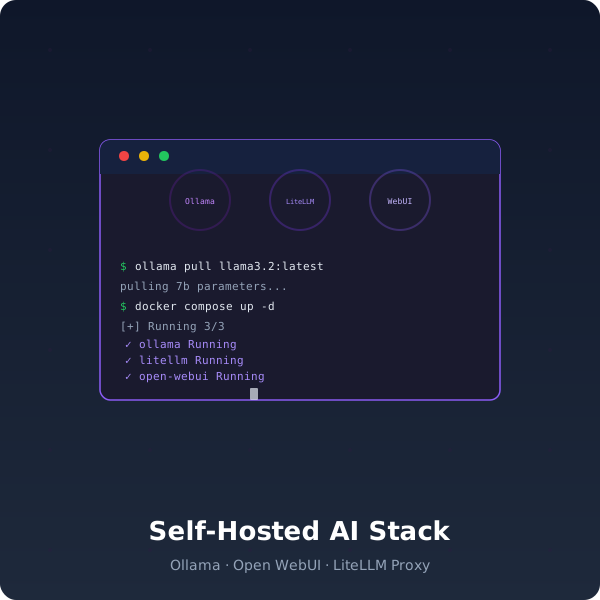
The official Ollama docs tell you to run ollama run llama3.1. Open WebUI has a one-line install script. LiteLLM's quickstart is three commands. Each tool works in isolation — and that's where the documentation stops.
What nobody tells you:
- Open WebUI has no authentication when you expose it on port 3000 — anyone who finds your IP can upload files and execute code through the built-in code interpreter
- Ollama consumes all available GPU memory by default — run a 32B model and your container orchestration tool (n8n, Dify) crashes with OOM
- LiteLLM's model routing config is undocumented — mapping
gpt-4calls to Ollama'schat/completionsendpoint requires knowing the exact proxy format - There's no backup strategy — Open WebUI stores conversations in SQLite and LiteLLM stores API keys in a JSON file. Lose the disk, lose everything
- No health checks — when Ollama silently hangs after a corrupted model download, you won't know until a user complains
This stack fixes all of those problems. It's the integration layer that turns three standalone tools into a production AI inference service.
Architecture
                    ┌──────────┐
     HTTPS          │   Nginx  │          :8080
  ──────────────────►  :443    ├──────────► LiteLLM ──────► Ollama :11434
                    │  TLS     │          :8000         (GPU)
                    └──────────┘               │
                                               ▼
                                         Open WebUI
                                           :3000
Nginx terminates TLS, applies security headers (X-Content-Type-Options, X-Frame-Options, CSP), and rate-limits requests. It proxies /v1/* to LiteLLM and / to Open WebUI — giving you a single HTTPS endpoint.
LiteLLM acts as an OpenAI-compatible proxy. Your applications send standard POST /v1/chat/completions requests and LiteLLM routes them to Ollama. It handles API key validation, rate limiting, and model fallbacks.
Ollama runs on the internal Docker network only — it's not exposed to the internet. Resource limits prevent it from consuming more than 90% of GPU memory, leaving room for other containers.
What's Inside
- docker-compose.yml — 3 services with resource limits, health checks, internal networking, and restart policies
- Nginx config — TLS termination via Let's Encrypt, security headers,
/v1→ LiteLLM routing, rate limiting - LiteLLM config — Model catalog mapping model names to Ollama, API key generation, rate limits per key, request logging
- .env.example — Every variable documented: model catalog, GPU memory limits, TLS certificate paths, backup schedule
- health-check.sh — Verifies all three services are responding, Ollama can load a model, and LiteLLM can proxy a completion
- backup.sh — Hot backup of Open WebUI SQLite and LiteLLM state to timestamped archives
What You'll Be Able To Do
- Serve models through a single OpenAI-compatible API — any SDK, any language,
base_url: "https://your-domain.com/v1" - Manage API keys — generate and revoke keys in LiteLLM, set per-key rate limits, track usage per model
- Load balance across models — configure fallback chains so if
llama3.1:70bis busy, requests route tollama3.1:8bautomatically - Expose one HTTPS port — Nginx handles TLS so your containers never see raw traffic
- Run health checks automatically — cron job verifies inference is working and alerts on failure
- Backup conversations and config — scheduled snapshots of all persistent state
Who This Is For
- Developers who want to self-host AI inference and need it to work reliably, not just on Friday afternoons
- Teams replacing OpenAI/Claude API calls with local inference — this gives you the OpenAI-compatible proxy
- Homelabers running Ollama who want authentication, backup, and TLS without spending a weekend on it
Requirements
- Docker Engine 24+ with Docker Compose v2
- NVIDIA GPU with 8GB+ VRAM (7B models) or 24GB+ (32B models)
- NVIDIA Container Toolkit
- Domain name with DNS pointing to your server (for TLS)
Quick Start
# Clone and configure
unzip self-hosted-ai-stack.zip
cd self-hosted-ai-stack
cp .env.example .env
# Edit .env: set your domain, model preferences, GPU memory limit

# Deploy
docker compose up -d

# Verify
./health-check.sh

# Pull a model
docker compose exec ollama ollama pull llama3.1:8b
Your AI inference service is now live at https://your-domain.com.
The Monday Morning Test
A developer on your team pushes code that calls openai.chat.completions. It hits your proxy. LiteLLM routes it to Ollama. Ollama loads the model and returns the response — all OpenAI-compatible, zero latency added.
No API key rotation needed. No monthly invoice. No "our OpenAI bill was €2,300 last month and counting."
Upgrade Path
This stack covers Ollama + Open WebUI + LiteLLM. If you need the full platform — Dify for RAG pipelines, n8n for workflow automation, Qdrant for vector search, Prometheus/Grafana for monitoring, and MinIO for backups — check out AI Infrastructure Mastery which includes this stack plus everything else.